TOP 200 Creative Prompts for Google Gemini | Nano Banana Ai Photo Editing
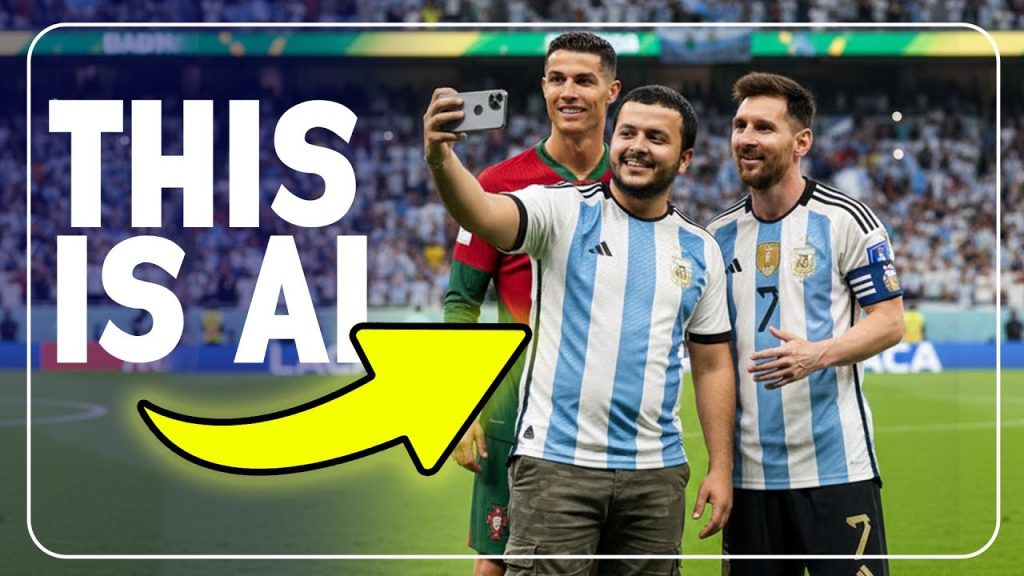
Photorealistic 4k image of standing on a bright, green football pitch, taking a close selfie with Cristiano Ronaldo and Lionel Messi. He is holding up a smartphone with one hand, smiling naturally. He is wearing a Argentina FC shirt, He is wearing a camouflage pants and white shoe of Adidas. Cristiano Ronaldo and Lionel Messi stand close on either side of him, smiling casually into the camera like friends posing for a fun picture. The stadium in the background is filled with cheering fans, blurred slightly to keep focus on the selfie group. Bright daylight, realistic details, crisp shadows, and vibrant. Note: use facial description from the uploaded image with body details as little chubby south asian man.
Apply a CRITICAL IDENTITY LOCK to preserve the exact facial features, hairstyle, skin tone, body proportions, age, and expression of the man in the uploaded photo. Capture a high-angle cinematic shot of him standing calmly in the middle of a chaotic crowd of paparazzi and fans. He is dressed in a sharp, dark suit, radiating poise and confidence.
He raises his wrist slightly, showing a gold Rolex Day-Date, but instead of looking at the watch, he looks directly at the camera with a cool, commanding gaze. One hand adjusts his sleeve near the watch while his other hand rests casually in his pocket.
The surrounding crowd is chaotic and pressing in, holding cameras and reaching toward him. Bright camera flashes burst across the scene, creating sharp highlights and deep shadows. The crowd’s faces are softened and slightly blurred so that all focus remains on him.
The overall mood is cinematic and slightly dark, amplifying his aura of dominance, control, and unshakable presence amidst the chaos.
Create a photo-realistic 8K high contrast, highily detailed sharp portrait of this man in the above image playing pool, captured from a low-angle perspective. He is leaning forward with intense focus, lining up a shot with the cue stick aimed directly at the cue ball. He wears a sky green colour t shirt, and a smart watch on his left hand gripping the cue stick inhigh resolution
Create an image using the attached image (no edit) He is wearing a Tshirt with a print S.K.Y STAR A tired fast asleep on the table with his apple open laptop, show the laptop light filling the dim room Make it more realistic . Shot from a dramatic side angle; crisp facial detail with swirling light in cinematic depth; soft white highlights, gentle fill from light bounce. Shot on a Canon EOS R5 with a 35mm f/1.4 lens, fine film grain, desaturated cold‑grade look with soft contrast, premium autumn editorial mood, vertical 9:16 aspect ratio
A modern, urban streetwear with 25 years young man , sitting on the hood of a sleek, modified sports car. He wears a stylish oversized hoodie with ‘S.K.Y’ written on it, White cargo pants, trendy high-top Jordan sneakers in white, orange, and gray, and fingerless gloves. His black hair,headband. He sports futuristic black-tinted sunglasses and strikes a cool pose with two fingers raised. The background is a mix of bold yellow and dark gray tones with a cyberpunk aesthetic, giving a modern, high-energy vibe. Highly detailed, Realistic, 8K resolution, vibrant colors
Ultra-realistic cinematic portrait of a young man, same facial features as reference, wearing white sunglasses, sky blue jacket, slim grey track pants with yellow stripes, and black sneakers, sitting casually on a weathered concrete edge.One leg bent, other hanging, arms resting on knee, head turned slightly right with a confident calm expression. A massive helicopter flies extremely low above, overcast cloudy sky, wide-angle low-angle shot, dramatic and surreal atmosphere.8k
use my image in Photorealistic full-body portrait of a man sitting on a green cube in a minimalist studio. He is wearing a clean green sweatshirt and green joggers with green sneakers and green socks. Background is solid deep red with soft, directional window-like shadows across it. Pose: relaxed, legs slightly apart, hands resting between knees, looking slightly up and to the right with a calm, thoughtful expression. Studio lighting: large softbox key light from camera right, gentle fill from left, subtle rim light to separate subject from background. Composition: centered, camera at low eye-to-waist level, slight downward tilt to capture full outfit. High detail: skin texture visible
Whimsical Ultra-realistic cinematic 8k of a stylish 5.5 inch young person in vibrant streetwear, sitting casually among giant fluffy white and blue clouds. Behind him, a fantastical oversized creature (e.g., a parrot ultra realistic ) emerges, blending naturally with the dreamy cloudscape. The person wears bold, oversized fashion (e.g., sky shirt , blue pant) with a relaxed modern aesthetic. Background is a clean turquoise sky with soft floating clouds. Smooth realistic texture, ultra-realistic. Large bold 6d lemon green text ” S.K.Y” above the scene, graphic design style Facebook
Night street photography of a stylish man walking. He wears a pink coat, sky tee, sunglasses, and carries a bag. Blurred neon city lights and pedestrians in the background. Urban atmosphere image generate
Ultra-realistic mirror selfie of a stylish man with glasses. He is wearing a loose brown sweater layered over a crisp pink T-shirt, paired with sky jeans. A silver chain necklace adds a subtle accessory touch. He holds a new modern sumsung s24 ultra smartphone gery colour in one hand, partially covering his face, while his other hand rests casually in his pocket. The scene is set in warm indoor lighting, creating a cinematic, moody atmosphere with soft shadow
A man (attached photo) standing confidently in the busy streets of Times Square, pointing up at a giant billboard that shows his own portrait. The billboard shows him wearing a blue leather jacket, white shirt, and grey jeans, looking stylish and powerful. The name S.K.Y is written in bold, futuristic neon text at the bottom of the billboard. The background is filled with New York City lights, yellow cabs, and tall buildings, with a cinematic and dramatic atmosphere, realistic photo style, high detail, natural lighting
Luxury lifestyle photo of a man in a rooftop infinity pool with a modern city skyline in the background. He looks back over his shoulder slim with abs, slightly lifting his sunglasses in a confident pose, showing his tattoos. The water glows with rich blue tones, while two women in bikinis lounge at the poolside, blurred in the background to create depth. Golden sunset light adds a cinematic and glamorous vibe, capturing the essence of high-end vacation and stylish confidence
Keep face unchanged, sharp. Full body in resort wear — short-sleeve shirt, linen pants, barefoot or sandals, sunglasses. Pose: walking on wooden pier. Background: turquoise waters, luxury overwater villas, clear sunny sky. Dreamy tropical 8K cinematic travel photo
A surreal digital artwork of the attached image, wearing a sky blue shirt with a dark grey blazer, sitting cross-legged on the edge of a highway overpass bridge while writing in a notebook. A stack of colorful books is placed beside on the bridge, and a large yellow backpack rests on the road below. The perspective makes the person appear giant compared to the vehicles and structures around. The background features modern overpasses, traffic lights, and an urban skyline under a dramatic sunset sky, blending realism with imaginative fantasy. Ratio 9:16 with 16K Resolution.
analog photos of a man around 2025 was taking pictures in a Pink with yellow stripes low rider car with big gold wheels in the driveway garden of a mansion in quezon city, the men was sitting in the front side in the hood with post model style holding a blue bandana handkercheif, wearing a white loose fit t-shirt with a big gold chain necklace with a gold cross diamond pendant, gold bracelet, gold watch, loose fit khaki dickies pants, and black nike cortez with soles and wite logo nike. in front of the man a musculine american bully lion sitting on the street and has a blue bandana on the neck. preserve the original face as possible to make it authentic.
Create a photo-realistic image of this man in the above image, sitting confidently on a blue white armchair in a luxurious high-rise apartment. He is wearing a dark sky blazer over a Pink shirt, paired with blue trousers and black formal grey. The man leans back casually with one arm on the armrest, exuding charisma and authority. enhancing his powerful presence. The background shows a large glass window with a city skyline and bright daylight, giving a sophisticated and realistic atmosphere. The lighting is cool and balanced, highlighting the textures of his suit and chair.
A dramatic portrait of a man in a Pink hoodie, sitting against a wooden wall, surrounded by flying playing cards frozen in mid-air. He has a serious and intense expression, with one hand resting under his chin in a thoughtful pose, and the other hand extended forward as if controlling or throwing the cards. The atmosphere is cinematic and mysterious, with sharp focus on the man and motion blur on the playing cards
Use the face from image attachment to create a photorealistic editorial-style full-body portrait of a tanned athletic man (late 20s–30s), dark hair and short beard, standing knee-deep in calm ocean water during golden hour sunset. He wears a woven straw hat slightly tilted, wearing a glasses, a lightweight white linen button-up shirt blue with top buttons undone and sleeves rolled to forearms, rolled-up khaki shorts wet at the hem, a simple necklace, a wristwatch and a ring. Pose: relaxed, one hand in pocket, one hand relaxed by side, looking slightly upward/forward with a calm, thoughtful expression. Composition: vertical portrait (9:16), centered subject, low camera angle slightly below eye level, rule of thirds for horizon placement, full-body visible. Lighting: strong warm backlight from the low sun directly behind the head producing rim light and halo, subtle front fill (reflector) to preserve facial detail and catchlights; soft golden-hour tones. Environment: gentle waves, subtle ripples, reflective wet sand with orange and teal highlights. Camera/style details: full-frame look, 50mm–85mm equivalent, f/1.8–f/2.2 for shallow depth of field, focus on eyes/upper torso, cinematic bokeh in background, high dynamic range, ultra-detailed skin texture and fabric texture, slight film grain for natural feel. Color grading: warm orange/pink highlights, moderate contrast, natural skin tones, slightly teal in shadows for cinematic look. Post-processing: subtle clarity increase, gentle dodge & burn, avoid oversmoothing skin—keep pores and realistic texture. Mood: calm, romantic, natural lifestyle editorial. High resolution, photorealistic, ultra-detailed.
A stylish 18 year handsome young man posing confidently at a Shell gas station at night, leaning on a modified orange Maclaren car with scissor doors open upwards. The car has a sleek, glossy finish with custom wheels and a lowered body. The man is wearing casual streetwear – white t-shirt, maroon jacket, blue jeans, and Sky puma sneakers. Bright gas station lights reflect on the car’s surface, creating a cinematic, urban night scene
Create ultra-realistic digital art of a person (use reference photo) in a dynamic full-body pose. The subject wears casual relaxed outfits in bold colors (shirt, pants, shoes), appearing stylish and modern. Add a single text ‘LEGGND’ displayed vertically, rendered as large 3D block glossy letters in a bold contrasting color. The text should appear only once, without repetition, and be big enough to look like a real object. Make the model interact with the text, for example sitting on
use my image in Using the reference picture, create a Cinematic hyper-realistic photograph, 8K resolution, of a handsome man in a elegant yellow linen shirt and tailored yellow trousers, my hair should Middle Part Hair, wavy, and stylish-think tousled, voluminous waves with a slightly messy quiff, dark brown in color, standing on a luxurious beachside balcony. i am casually adjusts his designer sunglasses with one hand while holding a vibrant bouquet of peonies and tulips in the other. The vast ocean with sparkling turquoise waves and a clear blue sky stretches out behind him. A soft, warm, breezy mood, golden hour lighting creating gentle highlights and shadows, romantic and refreshing atmosphere, shot on a Hasselblad medium format camera, incredible detail, film grain.
Use my image in A hyper-realistic, ultra-sharp cinematic portrait of a stylish man leaning casually against a sleek black Maserati MC20 supercar. The man stands in a relaxed pose with one leg slightly bent, resting his back against the glossy car door while bringing his right fist lightly to his face in a thoughtful gesture. He wears a fitted pink leather jacket, tailored pink pants, and dark sneakers with crisp dark blue soles. His confident expression is composed and slightly downward, lit with dramatic contrast and soft cinematic highlights. The Maserati gleams with reflective details under neon ambient lighting in shades of deep blue and crimson, adding vibrance and depth. Captured with a 50mm f/1.4 cinematic lens, producing a shallow depth of field with background motion blur and bokeh flares. Subtle lens flare, chromatic glow, and HDR sharpness enhance the atmosphere, creating a bold, stylish, and powerful luxury aesthetic.
For a gothic dark mood
“Edit the image into a gothic-inspired artwork, with dark shadows, moody purple-red tones, foggy atmosphere, and ancient cathedral vibes.”
For a minimalist pastel poster
“Turn the photo into a clean minimalist poster design, with soft pastel color blocks, geometric shapes, and modern typography style.”
For a fantasy ice kingdom
“Transform the image into an icy fantasy kingdom, with snowflakes, glowing ice crystals, frosty mist, and a soft blue-white magical glow.”
For a fiery lava effect
“Convert the photo into a volcanic landscape, with glowing lava cracks, red-orange fiery tones, ash smoke, and dramatic cinematic lighting.”
For a dreamy bokeh portrait
“Edit the subject into a dreamy portrait with glowing bokeh lights, warm tones, blurred background, and a cinematic depth of field effect.”
For a neon graffiti street style
“Turn the photo into an urban graffiti art scene, with glowing spray-paint walls, neon signs, street textures, and bold artistic colors.”
For a Japanese ukiyo-e painting
“Convert the photo into a traditional ukiyo-e style artwork, with flat colors, bold outlines, and a vintage Japanese woodblock print effect.”
For a luxury fashion magazine cover
“Edit the subject into a glossy fashion magazine cover look, with elegant typography, stylish lighting, and glamorous golden tones.”
For a post-apocalyptic world
“Transform the image into a post-apocalyptic landscape, with ruined buildings, dusty skies, glowing embers, and survival-themed cinematic tones.”
For a holographic rainbow effect
“Edit the photo with holographic rainbow overlays, prism light reflections, dreamy iridescent tones, and a futuristic color shine.”
For a fairytale castle setting
“Convert the photo into a fantasy fairytale castle backdrop, with glowing towers, enchanted lights, and a dreamy magical sky.”
For a 3D claymation style
“Transform the image into a stop-motion claymation look, with soft textures, rounded shapes, and handcrafted cartoonish details.”
For a fiery phoenix theme
“Edit the subject into a fiery phoenix transformation, with glowing wings, orange-red flames, sparks, and a mystical rebirth aura.”
For a vintage polaroid effect
“Turn the photo into a polaroid-style snapshot, with faded tones, instant film borders, warm lighting, and retro imperfections.”
For a celestial moonlight vibe
“Convert the photo into a moonlit fantasy, with glowing crescent moons, silver-blue night sky, and shimmering stardust around the subject.”
For a futuristic astronaut theme
“Transform the subject into an astronaut floating in outer space, with glowing planets, starlight reflections, and a cinematic cosmic background.”
For a vintage noir effect
“Convert the photo into a 1940s noir film style, with deep shadows, high contrast black and white tones, and a mysterious cinematic look.”
For a glowing cyber grid
“Edit the photo into a futuristic cyber grid environment, with glowing blue neon lines, digital holograms, and sci-fi atmosphere.”
For a dreamy galaxy portrait
“Turn the subject into a portrait surrounded by galaxies, glowing constellations, and purple-blue starlight halos.”
For a retro VHS glitch look
“Transform the image into a retro VHS tape style, with glitch distortions, scan lines, static noise, and 80s home video vibes.”
For a magical fairy garden
“Edit the subject into a whimsical fairy garden, with glowing flowers, sparkling dust, butterflies, and enchanted green light.”
For a bold pop art effect
“Convert the photo into a colorful pop art illustration, with halftone dots, bold primary colors, and comic-style outlines.”
For a steampunk fantasy
“Turn the photo into a steampunk world, with brass gears, glowing machinery, Victorian outfits, and mechanical wings.”
For a holographic prism look
“Edit the photo with rainbow prism reflections, futuristic iridescent light leaks, and dreamy glowing overlays.”
For an apocalyptic desert
“Transform the subject into a wasteland survivor, with dusty skies, cracked earth, glowing embers, and cinematic Mad Max vibes.”
For a neon Tokyo street style
“Convert the image into a Tokyo night street scene, with glowing neon kanji signs, rainy reflections, and vibrant cyberpunk colors.”
For a fantasy dragon theme
“Turn the subject into a fantasy warrior with a glowing dragon behind them, fire sparks, and a mystical epic atmosphere.”
For a magical snowfall effect
“Edit the image with falling snowflakes, frosty mist, glowing blue lights, and a dreamy winter fairytale look.”
For a surreal melting world
“Transform the photo into a surreal artwork where objects are melting, dripping colors, and bending shapes like a Dali painting.”
For a luxury golden glow
“Convert the subject into a glamorous golden portrait, with glowing metallic shine, luxury light effects, and sparkling particles.”
For a mystical crystal cave
“Turn the photo into a glowing crystal cave, with shimmering gems, light reflections, and an ethereal magical atmosphere.”
For a fiery superhero look
“Edit the subject into a superhero transformation, with glowing fire aura, sparks, and a cinematic comic-style background.”
For a soft dreamy pastel vibe
“Convert the image into a pastel fantasy artwork, with soft pinks, light blues, glowing highlights, and whimsical dreamy energy.”
For a glitchy digital art effect
“Edit the photo with digital glitch effects, RGB splits, pixel distortion, and a futuristic cyberpunk tech vibe.”
For a night cityscape mood
“Transform the photo into a cinematic night city skyline, with glowing lights, misty atmosphere, and deep moody tones.”
For a futuristic robot theme
“Convert the subject into a half-human, half-robot cyborg, with glowing circuits, metallic skin, and a sci-fi background.”
For a vintage painterly style
“Edit the image into a 19th-century painted portrait, with textured brush strokes, warm earthy tones, and classical lighting.”
For a fantasy angel look
“Turn the subject into a glowing angel, with large white wings, golden light beams, and a celestial heavenly sky.”
For a dreamy underwater portrait
“Edit the subject as if floating underwater, with glowing bubbles, blue-green light rays, and surreal aquatic tones.”
For a bold graffiti wall effect
“Convert the photo into a graffiti mural artwork, with spray paint textures, neon outlines, and bold urban street colors.”
For a fiery lightning storm
“Transform the subject into a dramatic scene with glowing purple lightning, stormy skies, and cinematic power effects.”
For a magical moon goddess
“Edit the subject as a moon goddess, with silver glowing hair, crescent moon halo, and mystical starry background.”
For a holographic fashion look
“Convert the image into a futuristic fashion photo with holographic clothing, neon lighting, and rainbow reflections.”
For a surreal floating islands theme
“Turn the background into floating sky islands, with waterfalls falling into clouds, glowing greenery, and dreamlike fantasy vibes.”
For a fiery cosmic explosion
“Edit the photo with a glowing galactic explosion behind the subject, with fiery sparks, nebula clouds, and cinematic cosmic lighting.”
For a dreamy rainbow fantasy
“Transform the image with glowing rainbow arches, pastel skies, and sparkling magical dust for a whimsical fairytale look.”
For a dark horror vibe
“Convert the subject into a horror movie scene, with eerie shadows, red glowing eyes, foggy atmosphere, and cinematic blood-red tones.”
For a futuristic neon warrior
“Edit the subject as a neon cyber warrior, with glowing armor, holographic weapons, and electric light effects.”
For a cosmic meditation theme
“Turn the subject into a spiritual cosmic scene, with glowing chakras, galaxy energy waves, and serene celestial lights.”
For a golden hour glow
“Edit the photo with warm golden hour sunlight, glowing soft shadows, and dreamy cinematic orange tones.”
For a futuristic space station
“Convert the photo into a sci-fi space station setting, with glowing panels, futuristic lighting, and distant planets.”
For a surreal mirror world
“Edit the subject standing between two surreal mirrors, with reflections bending into infinity, glowing light portals, and dreamlike energy.”
For a graffiti comic poster
“Turn the photo into a street-art comic book poster, with bold outlines, spray textures, and neon-punk vibes.”
For a magical galaxy crown
“Transform the subject with a glowing crown made of stars, nebula lights, and shimmering cosmic dust.”
For a fantasy forest goddess
“Convert the photo into a mystical forest goddess look, with glowing vines, sparkling leaves, and enchanted green light.”
For a glowing cyber samurai
“Edit the subject as a futuristic samurai, with neon swords, glowing armor, and a cyberpunk Tokyo backdrop.”
For a dreamy prism light effect
“Enhance the photo with glowing prism light leaks, rainbow reflections, and soft pastel dreamy vibes.”
For a volcanic warrior theme
“Turn the subject into a volcanic warrior, with molten lava cracks, glowing embers, and dramatic fiery tones.”
For a surreal floating bubble world
“Transform the background into a dreamy scene with giant transparent bubbles, glowing reflections, and soft pastel light.”
For a glowing crystal crown
“Convert the subject into a mystical queen with a crown made of glowing crystals, radiant light beams, and ethereal colors.”
For a futuristic glitch warrior
“Edit the subject with glitchy cybernetic armor, digital distortion effects, and glowing neon fragments.”
For a dreamy vintage postcard
“Turn the photo into a retro postcard artwork, with faded pastel tones, grainy paper texture, and elegant typography.”
For a cosmic firestorm
“Transform the photo into a galactic firestorm, with glowing nebula clouds, burning stars, and dramatic cosmic explosions.”
For a luxury diamond sparkle
“Convert the subject into a glamorous diamond-studded portrait, with sparkling light effects, silver shine, and luxury vibes.”
For a surreal desert mirage
“Edit the photo with glowing mirages, golden sands, and dreamy heatwave distortions under a mystical sky.”
For a fantasy phoenix rebirth
“Turn the subject into a glowing phoenix rebirth scene, with fiery wings, golden sparks, and radiant flames.”
For a cinematic stormy sea
“Transform the photo into a dramatic ocean storm, with crashing waves, lightning strikes, and deep cinematic tones.”
For a pastel cotton candy world
“Convert the image into a fantasy cotton candy land, with fluffy pink-blue clouds, glowing sparkles, and dreamy candy textures.”
For a glowing techno rave look
“Edit the subject into a futuristic rave scene, with neon lasers, glowing holograms, and vibrant digital colors.”
For a mystical desert night
“Turn the background into a desert under glowing stars, with neon-lit pyramids, mystical blue skies, and cosmic energy.”
For a golden angelic glow
“Convert the subject into an angelic figure with golden wings, radiant beams of light, and heavenly aura.”
For a futuristic astronaut goddess
“Edit the subject as a cosmic goddess in a glowing astronaut suit, with galaxies swirling around her.”
For a retro disco vibe
“Transform the photo into a 1980s disco style, with neon lights, glowing disco balls, and vibrant flashy colors.”
For a fantasy ice dragon theme
“Convert the subject into a mystical ice warrior with a glowing blue dragon, frosty sparks, and icy mist.”
For a surreal glass shatter effect
“Edit the photo with shattered glass fragments, glowing reflections, and futuristic holographic shine.”
For a dreamy starry night
“Transform the subject into a Van Gogh-inspired starry night scene, with glowing swirls, golden stars, and artistic brush effects.”
For a cybernetic hacker look
“Convert the photo into a digital hacker scene, with glowing code rain, neon green energy, and glitchy effects.”
For a futuristic neon desert
“Edit the photo into a neon-lit desert at night, with glowing cacti, cyberpunk skies, and holographic mirages.”
For a surreal rainbow waterfall
“Turn the background into a fantasy rainbow waterfall, with glowing mist, colorful light reflections, and dreamy sparkles.”
For a fiery demon aesthetic
“Transform the subject into a demonic character with glowing horns, fiery red eyes, and a dark hellfire background.”
For a luxury pearl shine
“Convert the photo into a glamorous portrait with pearl textures, glowing white shine, and elegant luxury atmosphere.”
For a cosmic eclipse effect
“Edit the photo with a glowing solar eclipse behind the subject, with golden flares, cosmic shadows, and dramatic lighting.”
For a mystical forest portal
“Turn the background into an enchanted portal hidden in a glowing forest, with magical light beams and sparkles.”
For a futuristic robotic armor
“Transform the subject into a fully armored robot warrior, with glowing circuits, metallic textures, and sci-fi lighting.”
For a surreal floating book theme
“Edit the subject surrounded by floating glowing books, magical letters in the air, and a dreamy academic fantasy atmosphere.”
For a dreamy cloud kingdom
“Transform the subject into a floating kingdom in the clouds, with glowing castles, pastel skies, and magical rainbow light beams.”
For a dark neon goth style
“Convert the photo into a gothic neon artwork, with glowing skulls, magenta-blue neon accents, and cyberpunk horror atmosphere.”
For a fantasy underwater palace
“Edit the subject into a glowing underwater palace scene, with corals, shimmering fish, and radiant turquoise-blue tones.”
For a surreal desert moonrise
“Turn the background into a glowing desert with giant moons rising, mystical shadows, and dreamy purple skies.”
For a cyber angel aesthetic
“Transform the subject into a futuristic cyber angel, with neon wings, glowing circuits, and celestial energy.”
For a vintage carnival vibe
“Edit the photo with a retro carnival theme, glowing Ferris wheels, warm golden lights, and dreamy circus atmosphere.”
For a fiery battle scene
“Convert the image into an epic battle setting, with glowing swords, fire sparks, and dramatic cinematic action effects.”
For a surreal floating lanterns look
“Edit the subject surrounded by glowing floating lanterns in the night sky, with golden reflections and magical particles.”
For a luxury emerald shine
“Turn the portrait into a glowing emerald theme, with green gemstone textures, radiant lighting, and elegant luxury vibes.”
For a futuristic AI interface
“Convert the photo into a sci-fi AI interface, with glowing HUD elements, holographic codes, and neon light overlays.”
For a pastel dream café
“Edit the photo into a kawaii pastel café scene, with pink and mint colors, glowing desserts, and a cozy dreamy mood.”
For a cosmic portal effect
“Transform the subject standing in front of a glowing cosmic portal, with swirling galaxies and radiant beams.”
For a dramatic foggy forest
“Convert the image into a cinematic forest scene, with glowing fog, mysterious shadows, and deep moody tones.”
For a futuristic neon festival
“Edit the photo into a cyberpunk festival look, with neon holograms, glowing fireworks, and electric atmosphere.”
For a surreal sandstorm scene
“Transform the subject into a desert survivor inside a glowing sandstorm, with golden dust particles and cinematic vibes.”
For a luxury sapphire glow
“Edit the portrait into a blue sapphire-inspired look, with radiant gemstone sparkles and glowing blue light effects.”
For a fantasy starlight river
“Convert the background into a glowing river of stars, with dreamy reflections and cosmic sparkling tones.”
For a neon jungle theme
“Transform the photo into a cyber jungle, with glowing neon plants, futuristic wildlife, and electric green lighting.”
For a surreal crystal wings effect
“Edit the subject with giant glowing crystal wings, radiant sparkles, and a magical aura.”
For a retro arcade style
“Convert the photo into an 80s arcade poster, with pixelated graphics, neon signs, and glowing video game vibes.”
For a cosmic waterfall fantasy
“Edit the background into a glowing cosmic waterfall, with flowing starlight, galaxies, and radiant purple tones.”
For a futuristic laser warrior
“Transform the subject into a laser-powered hero, with glowing red-blue beams and cybernetic armor.”
For a dreamy aurora night
“Convert the image into a glowing aurora borealis scene, with shimmering green and purple skies.”
For a luxury ruby shine
“Edit the portrait with glowing ruby gemstone effects, deep red tones, and elegant luxury highlights.”
For a surreal upside-down city
“Turn the photo into a world where the city is flipped upside down, with glowing lights and dreamlike surrealism.”
For a fiery galaxy wings look
“Edit the subject with glowing galaxy wings, fiery sparks, and cosmic energy aura.”
For a futuristic mech suit
“Transform the subject into a robotic warrior wearing a glowing mech exoskeleton.”
For a magical enchanted lake
“Convert the photo into a glowing lake scene, with soft blue lights, reflections, and floating lanterns.”
For a neon roller skate theme
“Edit the photo into a retro roller disco vibe, with glowing neon lights and 80s style colors.”
For a surreal giant flower field
“Transform the background into a fantasy world with oversized glowing flowers and dreamy skies.”
For a holographic sci-fi look
“Convert the subject into a hologram with glowing light grids, digital glitches, and rainbow reflections.”
For a dreamy crystal cave
“Turn the image into a glowing crystal cave, with sparkling walls and ethereal light.”
For a retro pin-up poster
“Edit the subject into a 1950s pin-up style artwork, with bold vintage colors and grainy textures.”
For a fiery volcano goddess
“Transform the subject into a volcanic goddess, with glowing lava hair and fiery background.”
For a neon cyber rave
“Convert the photo into a futuristic rave scene, with glowing neon lasers, holographic effects, and colorful smoke.”
For a fantasy ice queen
“Edit the subject into an ice queen with glowing crown, frosty sparkles, and snow aura.”
For a dreamy cosmic eclipse
“Transform the background with a glowing solar eclipse, golden flares, and mystical lighting.”
For a luxury silver shine
“Edit the portrait into a glamorous silver-inspired artwork with glowing metallic textures.”
For a surreal levitation effect
“Convert the subject into a floating figure surrounded by glowing orbs and dreamy particles.”
For a futuristic neon desert
“Edit the background into a neon-lit desert, with glowing holographic cacti and futuristic skies.”
For a cosmic phoenix rebirth
“Transform the subject into a glowing cosmic phoenix rising from galactic flames.”
For a dreamy pastel rainbow
“Edit the image into a pastel rainbow scene, with cotton candy clouds and glowing sparkles.”
For a vintage film noir poster
“Convert the photo into a 1940s noir poster, with bold typography and moody monochrome lighting.”
For a surreal shattered mirror look
“Edit the subject surrounded by broken mirror shards with glowing reflections.”
For a futuristic astronaut temple
“Transform the photo into a cosmic temple scene with glowing astronaut statues.”
For a glowing neon dragon
“Convert the subject into a warrior with a holographic neon dragon wrapping around them.”
For a dreamy crystal crown goddess
“Edit the portrait into a glowing goddess with crystal crown and sparkling aura.”
For a cyberpunk hacker effect
“Turn the photo into a glowing hacker scene with neon code rain and glitch overlays.”
For a magical rainbow fountain
“Convert the background into a glowing fountain with rainbow light streams.”
For a fiery cosmic storm
“Edit the photo with glowing meteors, fiery nebula clouds, and epic cosmic lightning.”
For a surreal candy land
“Transform the background into a candy kingdom, with glowing lollipops and pastel skies.”
For a vintage travel poster
“Convert the photo into a retro travel poster, with bold text and grainy pastel tones.”
For a fantasy glowing wolf
“Edit the subject standing beside a glowing mystical wolf spirit.”
For a dreamy pastel palace
“Transform the background into a glowing pastel palace with rainbow windows.”
For a luxury golden diamond theme
“Convert the portrait with glowing golden diamond sparkles and glamorous shine.”
For a surreal floating planets look
“Edit the subject surrounded by glowing floating planets in the sky.”
For a futuristic neon spaceship
“Transform the photo into a cyberpunk spaceship hangar with glowing lights.”
For a magical firefly night
“Convert the background into a glowing field filled with magical fireflies.”
For a pastel dream portrait
“Edit the subject into soft pastel tones, glowing highlights, and dreamy atmosphere.”
For a cosmic time warp
“Turn the photo into a glowing cosmic time portal with swirling galaxies.”
For a futuristic neon jungle
“Edit the background into a neon-lit jungle with glowing wildlife.”
For a surreal rainbow glass effect
“Convert the subject with glowing rainbow glass fragments surrounding them.”
For a luxury amethyst glow
“Edit the portrait into a glowing purple amethyst-inspired luxury look.”
For a fiery dragon wings effect
“Transform the subject with giant fiery dragon wings glowing in the background.”
For a dreamy cloud pastel world
“Convert the image into pastel clouds, rainbow skies, and glowing sparkles.”
For a cybernetic neon mask
“Edit the subject wearing a glowing futuristic neon mask with holographic effects.”
For a surreal mirror lake
“Transform the background into a glowing lake reflecting the galaxy above.”
For a golden phoenix goddess
“Convert the subject into a golden goddess rising from phoenix flames.”
For a dreamy starlight meadow
“Edit the background into a glowing meadow with sparkling starlight flowers.”
For a futuristic neon samurai
“Transform the subject into a cyber samurai with glowing neon swords.”
For a cosmic rainbow storm
“Convert the photo into a glowing rainbow storm with cosmic lightning.”
For a pastel ice cream world
“Edit the background into a pastel fantasy land made of glowing ice cream.”
For a luxury black diamond shine
“Transform the portrait with glowing black diamond textures and luxury vibes.”
For a surreal floating stairs
“Convert the background into glowing floating stairs leading into the sky.”
For a fiery galaxy goddess
“Edit the subject as a goddess glowing with fiery galaxies around her.”
For a futuristic neon battlefield
“Transform the photo into a glowing cyber battlefield with holographic weapons.”
For a dreamy pastel carousel
“Convert the image into a glowing pastel carousel scene with dreamy lights.”
For a cosmic glowing tree
“Edit the background with a giant glowing cosmic tree of light.”
For a surreal rainbow city
“Transform the photo into a glowing rainbow-lit futuristic city.”
For a luxury opal shine
“Convert the portrait into an opal-inspired look with glowing rainbow reflections.”
For a dreamy galaxy crown
“Edit the subject wearing a crown made of glowing galaxies.”
For a futuristic neon concert
“Transform the image into a glowing cyberpunk concert with neon holograms.”
For a fiery comet storm
“Convert the background into a glowing storm with flying comets and meteors.”
For a pastel crystal forest
“Edit the background into a pastel forest with glowing crystals.”
For a cosmic butterfly effect
“Transform the subject surrounded by glowing cosmic butterflies.”
For a neon vaporwave aesthetic
“Convert the photo into a glowing vaporwave artwork with pink-blue neon grids.”
For a surreal glowing pyramid
“Edit the background with a giant glowing pyramid under cosmic skies.”
For a luxury platinum shine
“Transform the portrait into a platinum-inspired luxury look with glowing effects.”
For a dreamy pastel rainbow road
“Convert the background into a glowing rainbow road leading into the clouds.”
For a cosmic aurora portal
“Edit the photo with a glowing aurora portal opening in the sky.”
For a futuristic neon dragon rider
“Transform the subject riding a glowing cyberpunk dragon.”
For a magical crystal waterfall
“Convert the background into a glowing waterfall made of crystals.”
For a fiery demon warrior
“Edit the subject into a glowing demon warrior with fiery horns.”
For a dreamy pastel balloon world
“Transform the background into a sky full of glowing pastel balloons.”
For a cosmic starlight wings
“Convert the subject with giant wings glowing with starlight.”
For a futuristic neon racing scene
“Edit the photo into a glowing neon cyber race with holographic cars.”
For a surreal rainbow sand dunes
“Transform the background into glowing rainbow-colored desert dunes.”
For a luxury gemstone crown
“Convert the subject into royalty wearing a glowing gemstone crown.”
For a dreamy pastel fairytale castle
“Edit the background into a glowing pastel castle in the clouds.”
For a cosmic galaxy explosion
“Transform the photo into a glowing galactic explosion with nebula clouds.”